This object provides daily attendance information for a particular student in a particular school on a particular date.
SIF_Events are reported for this object.
Batch Conditions:
Existing SIF_Condition elements to support:
@StudentPersonalRefId
@SchoolInfoRefId
@Date
@SchoolYear
Object Triggering
Event Type
Requirement
Add
When a new (Excuse NOT = X) attendance event is verified for a student and saved for a student with an enrollment.
When a student has both attendance and positive attendance.
*An Add is not sent when the only attendance occurrence that exists is a positive attendance (Unit attendance) event. Attendance event must exist on attendance table for given day to send Add.
When a student's enrollment exists which didn't previously existed.
Report attendance for each school the student has a Student School Enrollment record for.
Attendance date must fall on or between enrollment start and end dates.
A record will send for each distinct Date and Attendance Event.
Do not send records if the student's enrollment is marked as a No Show or State Exclude.
Add/Change/Delete
If Attendance Event Excuse is changed.
Change
If Attendance Comments on the Attendance table change.
When a (Excuse = X) attendance event is changed to a (Excuse NOT = X) attendance event.
Add/Change
If Positive Attendance Time In or Time Out Changes or Positive Attendance Time is removed.
Delete
Delete attendance record if all attendance is removed for the day. Note: When a student's enrollment is deleted, no delete events are sent.
Object Population and Business Rules
Requirement
Half Day absent (0.5):
The sum of all absent minutes the student is assigned in their periods, where the attendance code has Status = A and Excuse NOT = X, minus any Present Minutes must be >= ((Half Day Absent Minutes)), and < ((Whole Day Absent Minutes)).
If the student qualifies to report half day (0.5) absent:
StudentDailyAttendance/AttendanceCodeInfoRefId must match the RefId for the Absent/Unknown AttendanceCodeInfo object with AbsenceValue = 0.5 in the calendar.
When the calendar does not have an Absent attendance code with Excuse = Unknown, report the RefId for the attendance code in the calendar with Status = Absent and Excuse= Unexcused that has AbsenceValue = 0.5.
When neither an Absent/Unknown nor Absent/Unexcused attendance code exists in the calendar, do not report the absence.
Whole Day absent (1.0):
The sum of all absent minutes the student is assigned in their periods, where the attendance code has Status = A and Excuse NOT = X, minus any Present Minutes must be >= ((Whole Day Absent Minutes)).
If the student qualifies to report full day (1.0) absent:
StudentDailyAttendance/AttendanceCodeInfoRefId must match the RefId for the Absent/Unknown AttendanceCodeInfo object with AbsenceValue = 1.0 in the calendar.
When the calendar does not have an Absent attendance code with Excuse = Unknown, report the RefId for the attendance code in the calendar with Status = Absent and Excuse= Unexcused that has AbsenceValue = 1.0.
When neither an Absent/Unknown nor Absent/Unexcused attendance code exists in the calendar, do not report the absence.
Definitions:
Half Day Absent Minutes:
(System Admin>Calendar>Calendar>Grade Levels>Grade Level Detail>Half Day Absence (minutes)) for the grade the student is enrolled on this day.
When Null, (System Admin>Calendar>Calendar>Half Day Absence (minutes))
When Null, use 120.
Whole Day Absent Minutes:
(System Admin>Calendar>Calendar>Grade Levels>Grade Level Detail>Whole Day Absence (minutes)) for the grade the student is enrolled on this day.
When Null, (System Admin>Calendar>Calendar>Whole Day Absence (minutes))
When Null, use 240.
When the student is NOT either half or full day absent, a StudentDailyAttendance object must not be reported for this student and day.
Student does not have "State Exclude" = Checked on the enrollment unless the Zone Options allows these students to report.
Student does not have "No Show" = Checked on the enrollment unless the Zone Options allows these students to report.
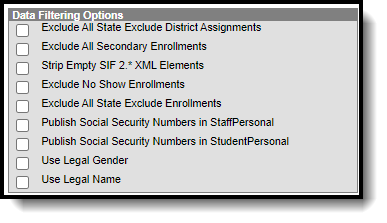
Student is not exclusively enrolled in a non-Primary enrollment on this day unless "Exclude All Secondary Enrollments" = NOT Checked.
Send records for only Primary enrolled students when "Exclude All Secondary Enrollments" = Checked.
The associated calendar does not have "Exclude from SIF Exchange" = Checked.
"Exclude from SIF reporting" on the enrollment State Grade Level is not checked.
The Attendance Code being referenced (AttendanceCodeInfoRefId) must be in the Attendance Code Allowed List:
System Admin>Data Interchange>Zones>SIF Zone Options>Attendance Code Allowed List
We will report all attendance codes when no attendance code is entered in the allowed list on the Zone Options tab.
Do Not Report when the Calendar > 'Exclude from SIF Exchange' is selected.
A Natural RefId is not created for this object, it is created by a compilation of IDs. Users can use other IDs within the object to run batch.
Object Data Elements
Data Element Label
Description
Business Rules
Data Source GUI Path
Database Field
M, C or O
@RefId
A GUID that identifies an instance of this object. This RefId is new for 2.7M and MUST be supported like other objects that have a RefId (i.e. it is the key for the object). The alternate keys MUST continue to be supported.
M
@StudentPersonalRefId
The ID (GUID) of the student for whom this attendance information is being reported.
The RefId for the student.
attendance.personId
M
@SchoolInfoRefId
The ID (GUID) of the school for which this attendance information is being reported.
The RefId for the school.
calendar.schoolId
M
@Date
The calendar date to which this attendance information relates.
The attendance date.
Attendance > Date
attendance.date
M
@SchoolYear
School year for which this enrollment is applicable, expressed as the four-digit year in which the school year ends (e.g. 2007 for the 2006-07 school year).
The school year.
Enrollment.endYear
M
AttendanceCodeInfoRefId
The ID (GUID) of the locally-defined daily attendance code information.
Report the RefId based on the most common absent (Status = A and Excuse NOT = X) attendance code assigned across all of the student's periods in the day.
When > 1 attendance code is considered most common (assigned during the same number of periods in the day), use the attendance code with the most absent minutes.
Otherwise, use the last-entered absent attendance code.
When the student is considered ((Half Day Absent)), report the AttendanceCodeInfo version with an AbsenceValue = 0.5.
When the student is considered ((Whole Day Absent)), report the AttendanceCodeInfo version with an AbsenceValue = 1.0.
The AttendanceCodeInfo RefId in the StudentDailyAttendance object provided for the student and day will always reference an existing, valid AttendanceCodeInfo.
attendance.status
attendance.excuse
M
TimeIn
The time the student entered or returned to school.
Attendance exists on a day
Report the start time of the student's first attended non-absent and non-Early Release instructional period in the day, where:
Status NOT = Absent or Early Release
Do not report this element when:
Student does not have any periods in the day in which:
Status isn't = Absent or Early Release
Format example: 08:52:00
Do not change the time format.
Attendance AND Positive Attendance exist on a given day
Follow Attendance exists logic above
Utilize the positive attendance TimeIn instead of the associated period startTime in the calculation for earliest time
Format example: 08:52:00
Do not change the time format.
Positive attendance will be ignored if the time overlaps a period with an entered absence on the attendance table.
System Administration> Calendar> Calendar> Periods
Student Information > General > Attendance > Positive Attendance > positive attendance record
period.startTime
AttendanceUnit.startTime
attendance
O
TimeOut
The time the student left school.
Report the end time of the student's latest attended non-absent, non-early release instructional period in the day, where:
Status NOT = Absent or Early Release
Do not report this element when:
Student does not have any periods in the day in which:
Status isn't = Absent or Early Release
Format example: 08:52:00
Do not change the time format.
Attendance AND Positive Attendance exist on a given day
Follow Attendance exists logic above
Utilize the positive attendance TimeOut instead of the associated period endTime in the calculation for lastest time
Format example: 08:52:00
Do not change the time format.
Positive attendance will be ignored if the time overlaps a period with an entered absence on the attendance table.
System Administration> Calendar> Calendar> Periods
Student Information > General > Attendance > Positive Attendance > positive attendance record
period.endTime
AttendanceUnit.endTime
attendance
O
AttendanceNote
Note related to this particular attendance.
Report the non-null Comment (Student Info>General>Attendance>Comments) from across all periods in which the student had a qualified(Not excuse = 'X'), "most common" absent Attendance Code where:
Status = Absent
Excuse NOT = Exempt AND
The Comments field is NOT Null
In the case of a tie, will select alphabetically by the code. (i.e: AE before AU)
*Positive Attendance recorded on the AttendanceUnit table will not be utilized.
Student Info>General>Attendance>Comments
Student Information > General > Attendance > Positive Attendance > positive attendance record