This article explains how the NCES and SCED course data is managed in Campus.

The NCES Code is a 12-digit number. When the SCED Subject Area and the SCED Course Identifier fields are populated, the NCES Code displays as a 5-digit number. When the remaining SCED fields are populated, the NCES Code displays a 12-digit number. When the Course Level field uses localized values with codes that are more than one character, the NCES Code can be longer than 12 digits.
NCES Code Sequence
The following information describes how the NCES Code is derived.| NCES Number Display | NCES Code |
|---|---|
| 5-digit Number | 2 digits from SCED Subject Area (01001)
3 digits from SCED Course Identifier (03003)  |
| 12-digit Number | 2 digits from SCED Subject Area (01001G091212)
3 digits from SCED Course Identifier (01001G091212) 2 digits from SCED Lowest Grade (01001G091212) 2 digits from SCED Highest Grade (01001G091212) 1 value from SCED Course Level (01001G091212) 2 digits from SCED Sequence (01001G091212) |
| 12-digit Number with Carnegie Unit Credit Populated | 2 digits from SCED Subject Area (01001G1.0012)
3 digits from SCED Course Identifier (01001G1.0012) 4 digits (includes decimal) from Available Carnegie Unit Credit (01001G1.0012) 1 value from SCED Course Level (01001G1.0012) 2 digits from SCED Sequence (01003G1.0012)  Available Carnegie Unit Credit values report when present over SCED Lowest/Highest Grade. |
Attribute Dictionary and NCES
NCES and SCED options are not editable in the Attribute Dictionary as they are a nationally standardized set of codes. These codes are automatically marked to copy forward with newly created calendars.
NCES Data syncs to State Edition applications. NCES Data also rolls forward with calendars, as NCES selections are tied to a courseID. Additional items added to the Attribute/Dictionary are automatically marked as Copies Forward.
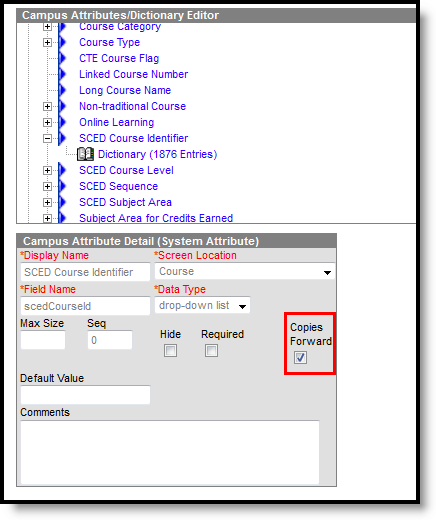 NCES Data - Copies Forward
Related resources
See the following resources:
- Course Information
- State Reports
