Tool Search: Program Services
The Program Services tool provides a way to enter and display records of program-related services a student has received. For example, records may be entered for students receiving Homeless, Migrant or Health services.
Required fields may vary by state. Follow local requirements regarding if, when and how any remaining fields are to be populated.
This article explains how to enter Homeless Services information for an individual student as a Program Service. See the Homeless Services article if you are a customer who uses the standalone tool rather than the Program Services: Homeless Services tool.
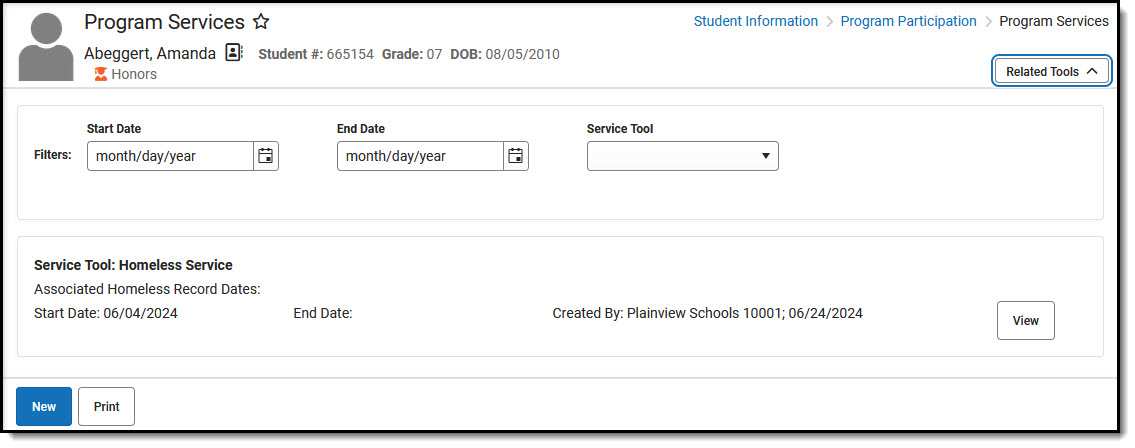 Program Services
See the Program Participation Tools Tool Rights article to learn about rights needed to use this tool.
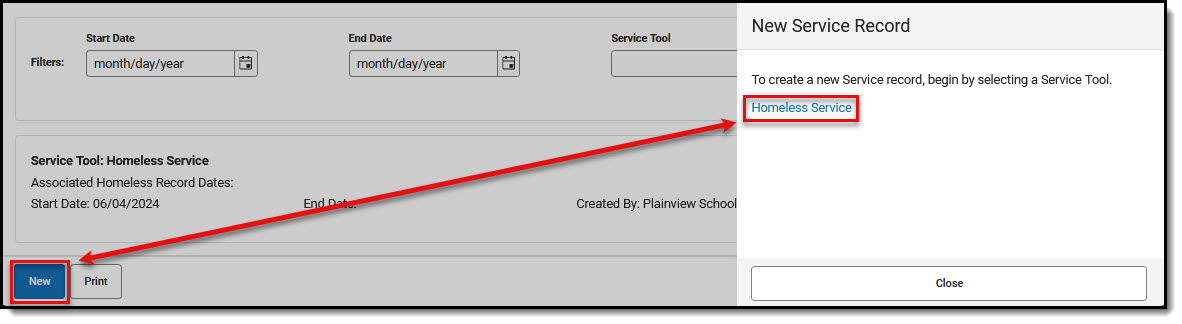 Program Services - New Service Record
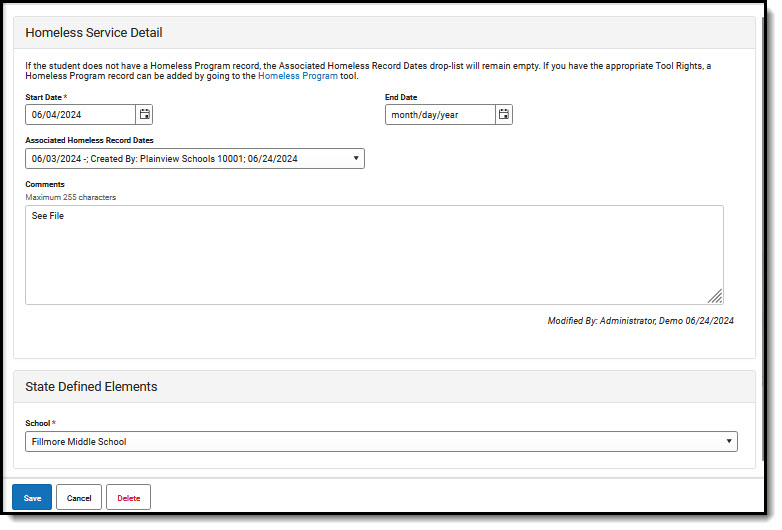 Program Services - Homeless Service Detail
Enter Homeless Service Record
- Select New.
- Choose Homeless Services. (Some states may have multiple service tools available for selection.)
- Start Date is a required field. Populate other fields according to your local practices.
- Note that if a student does not have an associated program record, the Associated (Program) Records Dates droplist will be blank. Users with rights to do so can follow the program link provided at the top of the editor to enter a program record if needed.
- Enter Comments if appropriate.
- Note that State and District Defined Elements will vary and will not appear if they have not been set up for you to use.
- Save when done.
Modify Homeless Service Record
- If the student has many Program Service Records, you may wish to use Filters to narrow the list of records being displayed.
- Locate the record you'd like to modify. Select View.
- Make changes. Save.
Print Homeless Services Summary
- Select the Print button.
- Select Homeless Service from the Print Summary Report side panel.
- The student's Homeless Service Summary appears in PDF form. Print or save the file.
Homeless Services Editor Fields
The Program Services tool includes the following fields. Field names and available selections vary by state. In Ad Hoc, Homeless Services is found under Student > Learner > Program Services > Homeless Services.
| Field | Description | Ad hoc Fields |
|---|---|---|
| Start Date
Required |
Indicates the date the student began receiving the program service.
Dates can be entered in mm/dd/yy or use the calendar icon to select a date. |
homelessService.startDate |
| End Date | Indicates the last date the student received the program service. | homelessService.endDate |
| Service Tool |
Indicates the service associated with the record. |
|
| Comments | Additional information can be entered in the Comments text field. | homelessService.comments |
| Created By | Displays in the Editor. Autogenerated name of district, date and timestamp indicating who created the entry. For State Edition customers, displays the state if the state created the entry. | homelessService.createdByID |
| Modified By | Displays in the Detail Editor. Indicates the person who last saved the selected record. | homelessService.modifiedByID |
| Associated Homeless Record Dates | Selected in droplist that corresponds to start and end dates entered on the Homeless Program record that is associated with this Homeless Service record. | homelessService.associatedHomelessRecordStartDate
homelessService.associatedHomelessRecordEndDate |
State-Specific Information
Fields may vary by state:
